Patch dimensions
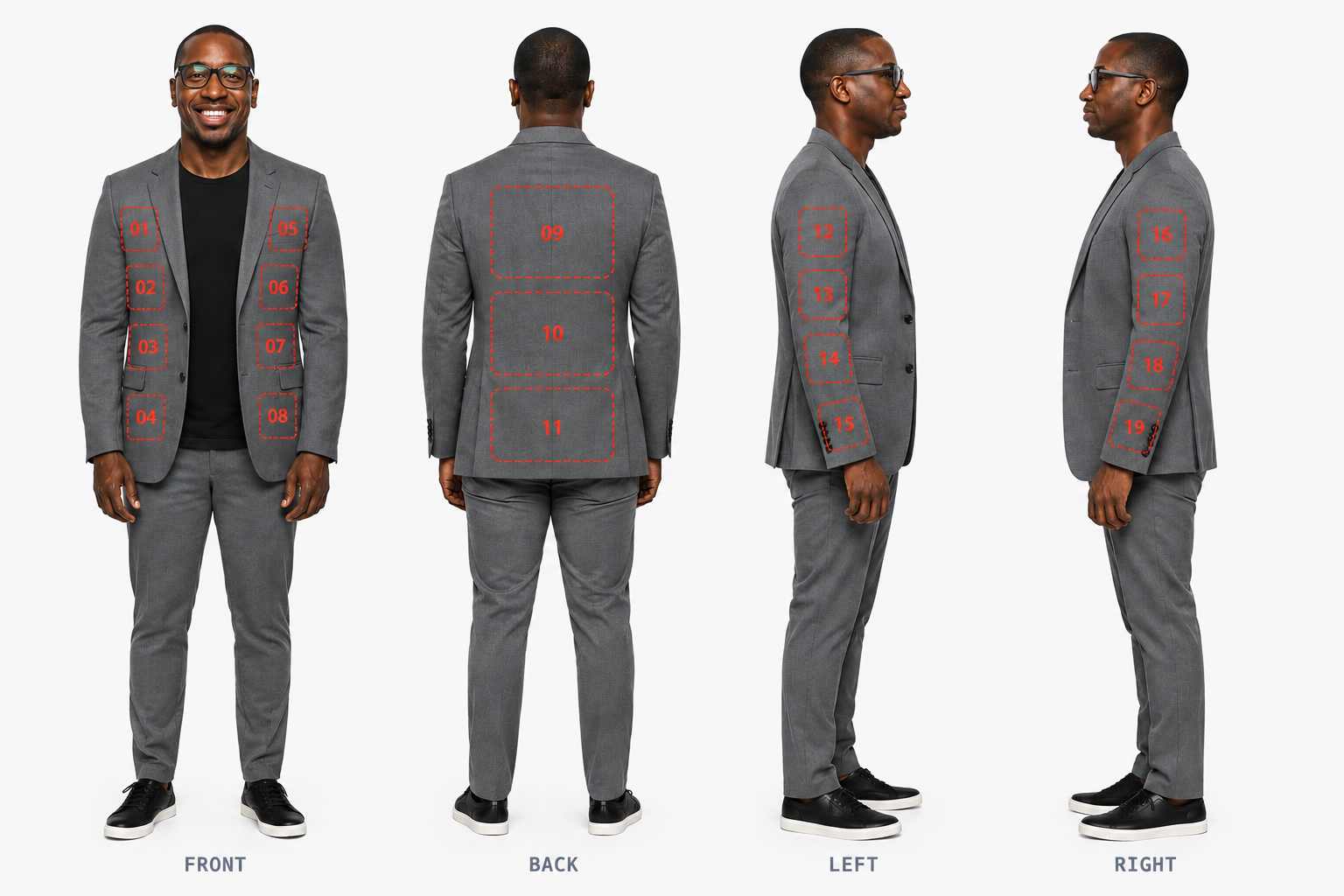
Use the numbered positions on the blazer placement map. All dimensions below are in inches.
| Positions | Dimensions |
|---|---|
| 01–08 | 4″ × 4″ |
| 09–11 | 12″ × 6″ |
| 12–19 | 2″ × 4″ |
Recommended File Formats
- PNG (PNG-24): The top choice for raster images because it supports true alpha transparency and lossless compression.
- Vector Files (AI, EPS, SVG, PDF): Ideal for logos and text. They scale to any size without losing quality, though you should outline or convert your fonts to curves before submitting.
Key Requirements Checklist
- Resolution: At least 300 DPI scaled to the exact physical size you want printed.
- Background: Must be 100% transparent if needed. The printers will print any non-transparent background.
- Color Mode: RGB preferred.
- Do Not Mirror: Leave the artwork un-mirrored; the printer's software handles the flip automatically.
Before you pay
Prepare your artwork at the dimensions for your selected position. Check that your text and logo are clear at the final patch size.
Review spelling, colours, logos, contact details and the complete design before completing payment.
Designs are final after payment
Once payment is made, your designs are final and cannot be changed.
If you have any questions about your artwork, contact us before paying.